Your comments

Looks like your theme CSS might be interfering with the arrows. Can you post a link to the site? I'll send you some CSS to use to fix it.
You will likely need to re-add the code to the theme. Go to the Template page in the app and make a change to the template and re-save it. That will create new section code. Then you can click the Instructions button for help getting it on your site.
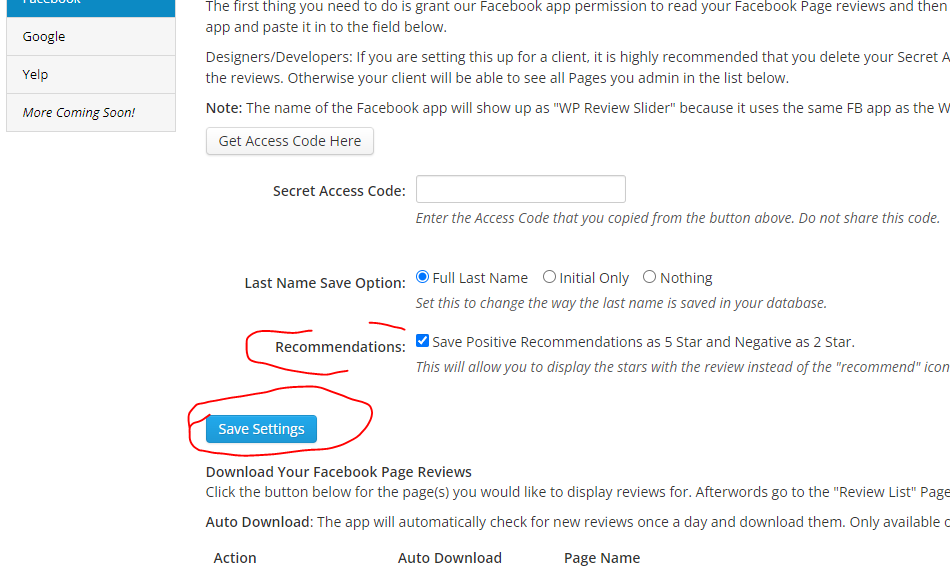
There is now an option to use the stars instead of the "recommend" icon. You will need to check the box, Save Settings, and then re-download the reviews.

Great! I guess something got messed up in the copy.
Try re-launching the app from Shopify Admin.


You could try using tags. You can enter tags on the Review List page by editing the review. You have a "buyer" tag and a "seller" tag. You can also use the "Bulk Edit" button at the top which will add a tag to all reviews currently being displayed. Then you can use the review template > filter > filter by tag setting.
Are you choosing which reviews to add to the slide? If so, it wasn't really designed to work that way. If you leave all the filters off then it will display all reviews on the Review List page. Then just filter out the ones you don't want to show, rather than picking that many to show.
Log in to Shopify > click on Apps > Apps and sales channel settings > Remove.
Customer support service by UserEcho


I'm not seeing the reviews on the site. Can you send me a direct url to them?